Using addEventListener in React's Function component
Use the method in React's function component addEventListener:
- Set the ref attribute on the element.
- Use the current attribute on the ref to access the element.
-
useEffectAdd event listeners in the hook .
import {useRef, useEffect} from 'react';

const App = () => {
  const ref = useRef(null);

  useEffect(() => {
    const handleClick = event => {
      console.log('Button clicked');
    };

    const element = ref.current;

    element.addEventListener('click', handleClick);

    return () => {
      element.removeEventListener('click', handleClick);
    };
  }, []);

  return (
    <div>
      <button ref={ref}>Click</button>
    </div>
  );
};

export default App;
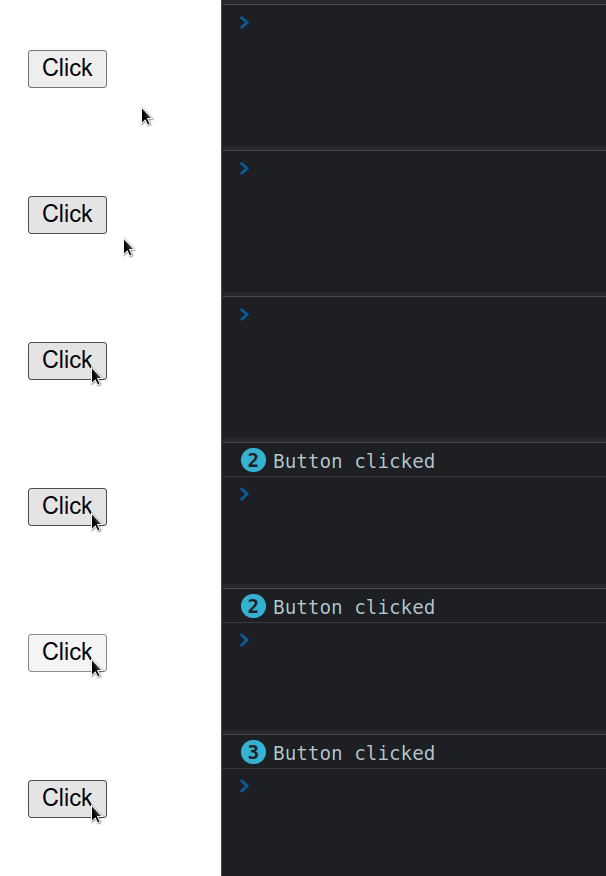
We useEffectadded an event listener to the element in the hook of the functional component.
If you want to add an event listener to the window or document object, use the same method but don't include the ref.
useRef()The hook can be passed an initial value as an argument. The hook returns a mutable ref object whose .current property is initialized to the passed argument.
请注意, we have to access the current property of the ref object in order to access the button element on which we set the ref attribute.
When we pass a ref prop to an element, for example <div ref={myRef} />, React sets the properties of the ref object .currentto the corresponding DOM node.
We pass an empty dependenciesarray to useEffectthe hook, so it will only run when the component mounts.
We only want to call
addEventListenerthe method once - when the component mounts.
useEffect(() => {
  const handleClick = event => {
    console.log('Button clicked');
  };

  const element = ref.current;

  element.addEventListener('click', handleClick);

  return () => {
    element.removeEventListener('click', handleClick);
  };
}, []);
We store a reference to the element in a variable and use addEventListenerthe method to add a click event listener to the button.
The method takes as its first argument the type of event to listen for, and as its second argument a function to be called when an event of the specified type occurs.
The function we useEffectreturn from the hook is called when the component unmounts.
We use removeEventListenerthe method to remove the event listener we registered previously.
The cleanup step is important because we want to make sure that we don't have any memory leaks in our application.
For reprinting, please send an email to 1244347461@qq.com for approval. After obtaining the author's consent, kindly include the source as a link.
Related Articles
How to avoid cross-origin (CORS) issues in React/Next.js
Publish Date:2025/03/17 Views:170 Category:NETWORK
-
In this article, we will introduce how to avoid cross-origin (CORS) issues in React/Next.js. Cross-origin resource sharing (CORS) is a protocol that defines how web requests should be handled when crossing different URLs.
React Tutorial - Transferring Props
Publish Date:2025/03/16 Views:188 Category:React
-
React transfers Props. Props are generated when components are encapsulated. Components expose some properties (Props) to the outside world to complete some functions.
React Tutorial: Props Anti-Pattern
Publish Date:2025/03/16 Views:187 Category:React
-
React's Props anti-pattern, using Props to generate state in getInitialState is an anti-pattern - Anti-Pattern.
React Tutorial - Props Validation
Publish Date:2025/03/16 Views:102 Category:React
-
Props validation is a very useful way to use components correctly. It can avoid many bugs and problems as your application becomes more and more complex. In addition, it can make your program more readable.
React tutorial: Types of Props for child components
Publish Date:2025/03/16 Views:172 Category:React
-
Usually, the child components of a React component are a group, that is, the child components are an array. Introduction to Type of the Children Props.
How to solve the error Uncaught TypeError: Cannot read properties of undefined in
Publish Date:2025/03/16 Views:153 Category:React
-
In the process of React development, we often encounter some errors. Here we look at an error reported in App.js. The error is as follows: App.js:69 Uncaught TypeError: Cannot read properties of undefined (reading 'setState') at onInput
Why do you need to bind event handlers in React Class Components?
Publish Date:2025/03/16 Views:60 Category:React
-
When using React, we must have come across control components and event handlers. We need to use `.bind()` in the constructor of the custom component to bind these methods to the component instance. As shown in the following code:
Solution to the error "does not contain a default export" in React
Publish Date:2025/03/16 Views:191 Category:React
-
When we try to use `default import` to import from a module that does not have a `default export`, we get a "does not contain a default export" error. To fix the error, make sure the module has named exports and wrap the import in curly braces, e.g.
Error in React: Attempted import error 'X' is not exported from Solution
Publish Date:2025/03/16 Views:78 Category:React
-
In React, the error “Attempted import error 'X' is not exported from” in React.js occurs when we try to import a named import that does not exist in the specified file. To fix the error, make sure the module has named exports and you have not obfu

