List all tables in PostgreSQL INFORMATION_SCHEMA table
Let's start with a simple question. INFORMATION_SCHEMAWhat exactly is it?
INFORMATION_SCHEMAProvides us with information about the objects defined in our database. It contains a set VIEWSof objects that store QUERYthe database objects.
The following query acts like a VIEWin that it returns a YOUR_TABLElogical containing rows TABLE.
Select * from [your_table]
INFORMATION_SCHEMAis pre-existing, which means that the database user can access this table and all privileges, incl., when needed DROP.
This SCHEMAcontains various database objects, so if you want to access a specific object, it is best to write the name of the object, for example TABLES, to retrieve all tables.
Now let's go ahead and see how we can use it.
INFORMATION_SCHEMABasic SELECTquery
to search the table in PostgreSQL
To get SCHEMAall the tables in this , a very simple query is to write something like this.
select * from information_schema.tables
This will return a table like this.
Output:

Here you can see all the tables in the database and TYPEtheir
However, there is one confusing aspect to this output. If you scroll down OUTPUTa bit, you'll notice this.
Output:
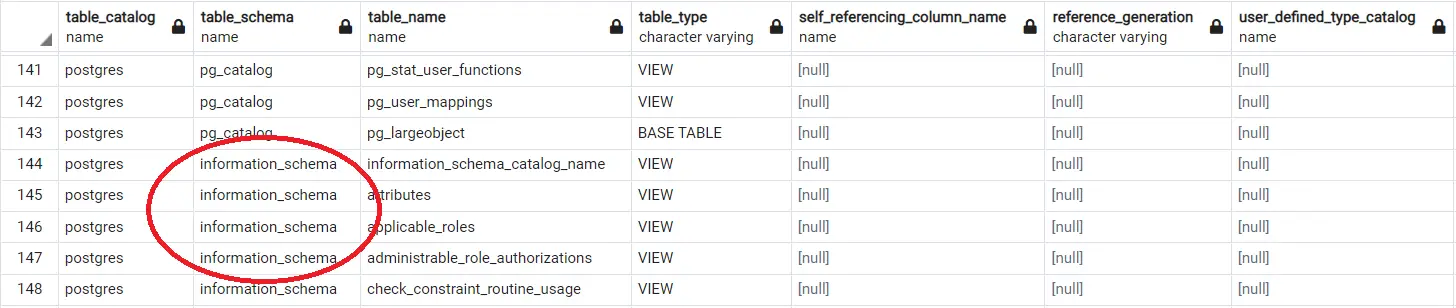
Here you will see different tables TABLE_SCHEMAset to INFORMATION_SCHEMA. But we are not calling INFORMATION_SCHEMA.TABLES, so what is this?
Let us explain. TABLE_SCHEMATell us SCHEMAcontains the table.
When we call INFORMATION_SCHEMA.TABLES, it returns all objects defined by the database rules in its document. Therefore, it also includes PG_CATALOGand PUBLICtables.
But tables that TABLE_SCHEMAhave set to tend to follow something called , which means they can be viewed on other different DBMS systems. You can see this by searching for on Google .INFORMATION_SCHEMASQL STANDARDISO/IEC 9075SQL 标准
In contrast, PG_CATALOGthere are only PostgreSQL-specific tables; therefore, they are included in this domain.
As a side note, INFORMATION_SCHEMAyou might also prefer to SYSTEMexport these tables as compliant SQL STANDARDmetadata.
Query modification INFORMATION_SCHEMAin
PostgreSQLSELECT
To get the tables individually from the range of tables returned by the above query INFORMATION_SCHEMA, we use:
select * from information_schema.tables where table_schema = 'information_schema'
Or, if you want to display a different set of tables, you can TABLE_SCHEMAchange to PUBLICor PG_CATALOG.
Running the same query in PSQLreturns:
Output:
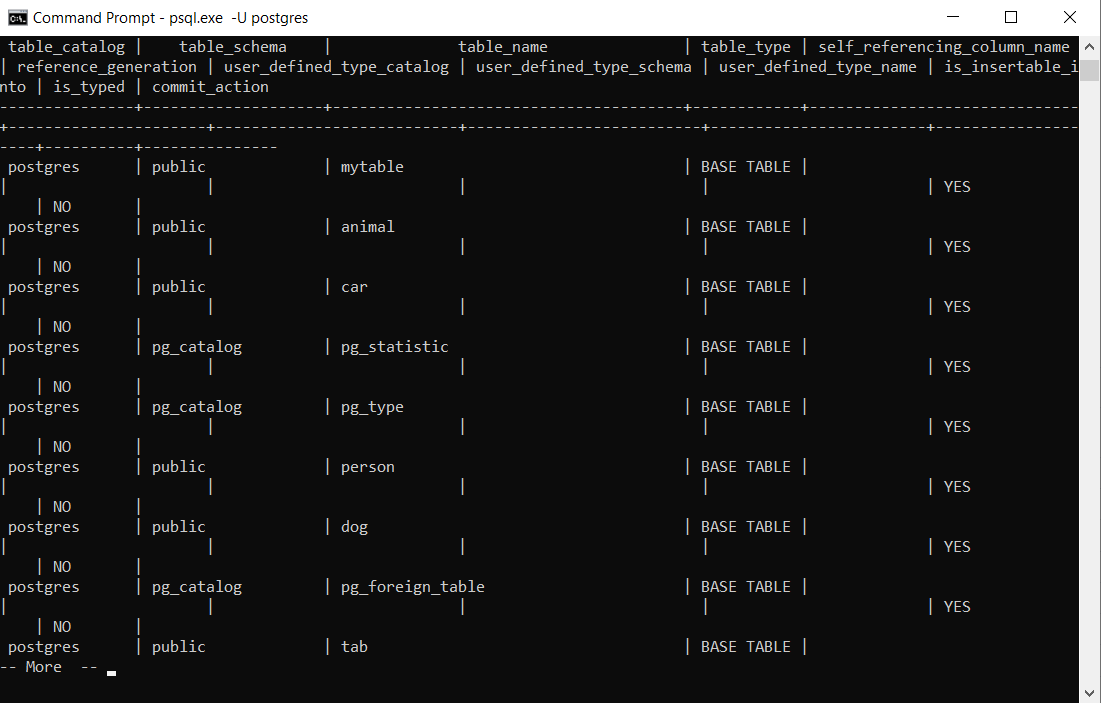
PostgreSQL INFORMATION_SCHEMAList (Job Update) PSQLStatement
To PSQLview it in the console INFORMATION_SCHEMA, you can issue the following statement:
postgres=# \dt information_schema.*
This will return INFORMATION_SCHEMAall objects in . DTServes as a shorthand for listing a table.
Returns the table in a PostgreSQL database\z
Another very commonly used method might include \z. This is incorrectly written as '/z', which can lead to errors.
The statement is as follows.
postgres-# \z
This basically returns the table made by the user. Additionally, you can use:
postgres-# \dn information_schema
This tells SCHEMAus OWNER.
\zModify to get all tables in PostgreSQL
An alternative to the first solution is to use:
postgres-# \dt *.*
This will return all tables as before.
We hope you've seen some of the different ways we can display tables for our users INFORMATION_SCHEMA. We always do our best to explore possible solutions to problems.
Today we have covered INFORMATION_SCHEMAthe display of and the different commands and tables that may be used.
For reprinting, please send an email to 1244347461@qq.com for approval. After obtaining the author's consent, kindly include the source as a link.
Related Articles
Terminate the PostgreSQL connection
Publish Date:2025/04/11 Views:199 Category:PostgreSQL
-
In this article, we will learn how to terminate a PostgreSQL session. Any open connections are run by background processes or tasks, PSQL which may no longer exist despite exiting the user interface or command line tool. Use ps -ef or grep
Single query to rename and change column type in PostgreSQL
Publish Date:2025/04/11 Views:166 Category:PostgreSQL
-
This article describes how to rename a column and change its type in PostgreSQL using only a single query. Renaming and changing column types in MySQL In MySQL , if you want to change the column type and rename it, you can use a simple stat
Joining columns using Select in PostgreSQL
Publish Date:2025/04/11 Views:176 Category:PostgreSQL
-
MySQL PostgreSQL is an object-relational database system, which means it can support more complex data types than its competitors . Today we will learn how to use SELECT the operator to join the columns of a table. Using operators to || joi
Using CASE in PostgreSQL
Publish Date:2025/04/11 Views:124 Category:PostgreSQL
-
This article shows how to use the statement in PostgreSQL CASE . CASE How to use the statement in PostgreSQL case Statements are similar to those in general-purpose programming languages if-else . But in SQL, if you want to write IF-ELSE ,
Using NOT IN with subqueries in PostgreSQL
Publish Date:2025/04/11 Views:93 Category:PostgreSQL
-
NOT IN The inverts the result of NOT simply using IN the operator. NOT IN The right side of the operator must have a subquery in which multiple columns are returned to check whether the expression matches the data. NOT IN Tends to return tr
Using variables in PostgreSQL
Publish Date:2025/04/11 Views:171 Category:PostgreSQL
-
This article will demonstrate how we can declare and assign values to variables in PostgreSQL. In PostgreSQL, DECLARE variables are declared using Often you will need variables in your PL/SQL scripts. In DECLARE the section called , y
Connect to PostgreSQL using a password
Publish Date:2025/04/11 Views:171 Category:PostgreSQL
-
This article shows various ways to connect to PostgreSQL using a password. It can be through the command line, pgpass a file, PGPASSWORD an environment variable or a connection string. Connecting to PostgreSQL with a password using the comm
Deleting a database in PostgreSQL via PSQL
Publish Date:2025/04/11 Views:166 Category:PostgreSQL
-
There are two ways to access PostgreSQL objects and databases on your system. One is through an interface, such as a graphical interface like PGADMIN, and the other is the basic command line tool psql. Today, we will look at DROP DATABASE t
Using the database in PostgreSQL
Publish Date:2025/04/11 Views:132 Category:PostgreSQL
-
This article demonstrates connecting to a database, creating a new database, and creating a table in PostgreSQL. Available databases in PostgreSQL You can run the following command after opening the Postgres command line to view all availab

