Extracting the day of the week from a date field in PostgreSQL
In this article, we will learn how DATEFIELDto find the day of the week from a given in the table in PostgreSQL. We will also learn about different operations that you can use to manipulate and work with DATEFIELDthe data in .
We use EXTRACTthe function to perform such operations, which retrieves subfields from a with . Let's see how to use it DATE.STRING
EXTRACTExtract the day of the week from a date field
in PostgreSQL using
To extract the day of the week, we can use DOWor ISODOW. DOWUsing SUNDAYas the start date starts the date at 0, but ISODOWusing MONDAYand SUNDAYsets the day of the week to 7.
Query:
select extract (isodow from timestamp '2022-03-25');
This uses TIMESTAMPto get the day of the week and returns it.
Output:
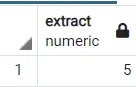
So in 2022 年 3 月 25 日, if you SUNDAYstart numbering from 0, then the day is Friday, you'll see FRIDAYis 5.
Now suppose we choose SUNDAYas our day. In this case, DOWwill return 0, while ISODOWwill return 7, since their modes are different.
You can also test these values yourself:
select extract (isodow from timestamp '2022-03-28') as iso_dow, extract (dow from timestamp '2022-03-28') as d_ow;
Suppose you want MONDAYto have a value 0. In such a problem, you can use the following statement:
select extract (isodow from timestamp '2022-03-21') - 1;
In TUESDAYthe case of , you would subtract 2, and so on.
To_CHAR()Use the function to get a date from a string
in PostgreSQL
Another function that returns the name of the day is To_CHAR().
Query:
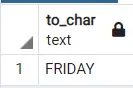
select to_char(timestamp '2022-03-25', 'DAY');
Output:
Query:
select to_char(timestamp '2022-03-25', 'DY');
Using the query above will return FRIinstead of FRIDAY. You can read about the possible keywords to use in the second parameter.
To get it DAY, just use the following code.
Query:
select to_char(timestamp '2022-03-25', 'D');
An excerpt from the PostgreSQL documentation follows:
to_char(..., 'ID')'s day of the week numbering matches the extract(isodow from ...) function, but to_char(..., 'D')'s does not match extract(dow from ...)'s day numbering.
This means that even if the pattern matches, calling Das the second argument does not match DOWthe syntax.
Day divisions CASEdefined
in PostgreSQL usingTIMESTAMPS
The following code uses EXTRACTan extended version of the method.
Query:
with a as (select extract(dow from date '2022-02-21') a ),
b as(select CASE
         WHEN a.a = 0 THEN 'Sunday'
         WHEN a.a = 1 THEN 'Monday'
         WHEN a.a = 2 THEN 'Tuesday'
         WHEN a.a = 3 THEN 'Wednesday'
         WHEN a.a = 4 THEN 'Thursday'
         WHEN a.a = 5 THEN 'Friday'
         WHEN a.a = 6 THEN 'Saturday'
   END from a )
 select * from a, b;
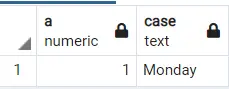
It gets the value aand then bchecks aif the matches the given CASEstatement. The value is copied into b(if any).
This will return the output shown below.
Output:
STRINGWe hope that you now understand the various methods that
can be used to extract the day of the week from any given .
For reprinting, please send an email to 1244347461@qq.com for approval. After obtaining the author's consent, kindly include the source as a link.
Related Articles
Terminate the PostgreSQL connection
Publish Date:2025/04/11 Views:199 Category:PostgreSQL
-
In this article, we will learn how to terminate a PostgreSQL session. Any open connections are run by background processes or tasks, PSQL which may no longer exist despite exiting the user interface or command line tool. Use ps -ef or grep
Single query to rename and change column type in PostgreSQL
Publish Date:2025/04/11 Views:166 Category:PostgreSQL
-
This article describes how to rename a column and change its type in PostgreSQL using only a single query. Renaming and changing column types in MySQL In MySQL , if you want to change the column type and rename it, you can use a simple stat
Joining columns using Select in PostgreSQL
Publish Date:2025/04/11 Views:176 Category:PostgreSQL
-
MySQL PostgreSQL is an object-relational database system, which means it can support more complex data types than its competitors . Today we will learn how to use SELECT the operator to join the columns of a table. Using operators to || joi
Using CASE in PostgreSQL
Publish Date:2025/04/11 Views:124 Category:PostgreSQL
-
This article shows how to use the statement in PostgreSQL CASE . CASE How to use the statement in PostgreSQL case Statements are similar to those in general-purpose programming languages if-else . But in SQL, if you want to write IF-ELSE ,
Using NOT IN with subqueries in PostgreSQL
Publish Date:2025/04/11 Views:93 Category:PostgreSQL
-
NOT IN The inverts the result of NOT simply using IN the operator. NOT IN The right side of the operator must have a subquery in which multiple columns are returned to check whether the expression matches the data. NOT IN Tends to return tr
Using variables in PostgreSQL
Publish Date:2025/04/11 Views:171 Category:PostgreSQL
-
This article will demonstrate how we can declare and assign values to variables in PostgreSQL. In PostgreSQL, DECLARE variables are declared using Often you will need variables in your PL/SQL scripts. In DECLARE the section called , y
Connect to PostgreSQL using a password
Publish Date:2025/04/11 Views:171 Category:PostgreSQL
-
This article shows various ways to connect to PostgreSQL using a password. It can be through the command line, pgpass a file, PGPASSWORD an environment variable or a connection string. Connecting to PostgreSQL with a password using the comm
Deleting a database in PostgreSQL via PSQL
Publish Date:2025/04/11 Views:166 Category:PostgreSQL
-
There are two ways to access PostgreSQL objects and databases on your system. One is through an interface, such as a graphical interface like PGADMIN, and the other is the basic command line tool psql. Today, we will look at DROP DATABASE t
Using the database in PostgreSQL
Publish Date:2025/04/11 Views:132 Category:PostgreSQL
-
This article demonstrates connecting to a database, creating a new database, and creating a table in PostgreSQL. Available databases in PostgreSQL You can run the following command after opening the Postgres command line to view all availab

